Overview
Parent and guardian accounts on Overgrad must be set up by the student's school. If you'd like access to your student's progress, contact their school counselor to request an account. Once it's created, you'll receive an email invitation with next steps.
Setting Up Your Account
When your account is created, you'll receive an email from Overgrad that looks like this: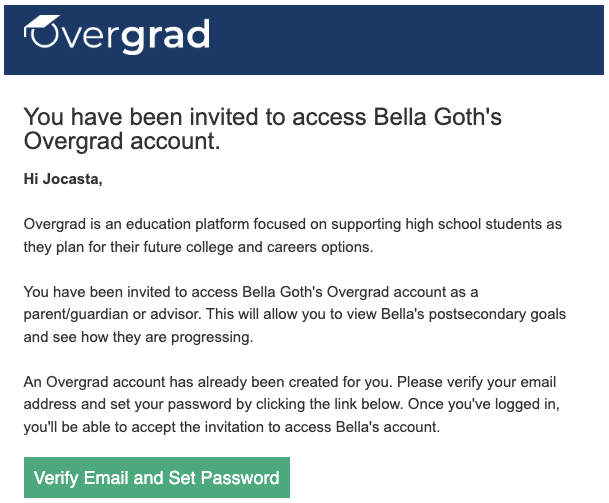
Click the link in the email to set your password. Once your password is set, you'll be taken to Overgrad and see this screen:
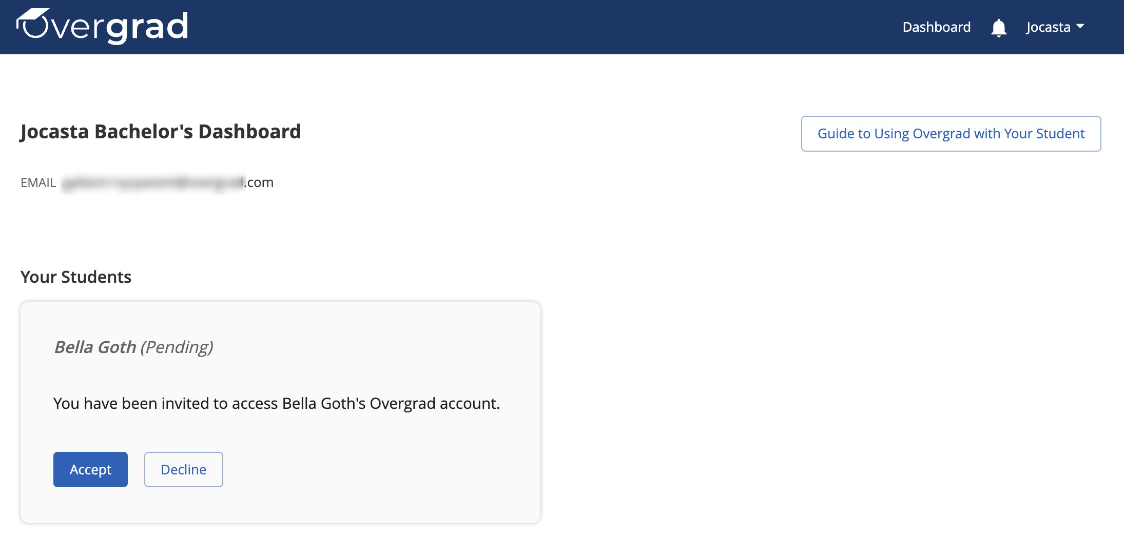 Click Accept to confirm.
What You Can See and Do on Overgrad
Once you've accepted the invitation, you'll have access to your student's Overgrad account. From there, you can:
- Search for colleges and careers, and add them to your student's list
- View your student's profile, including their academic information and progress
- Register for events at your student's school, if the school has included parents in the invitation
- Message your student's counselor directly through Overgrad
Was this article helpful?
That’s Great!
Thank you for your feedback
Sorry! We couldn't be helpful
Thank you for your feedback
Feedback sent
We appreciate your effort and will try to fix the article