This feature is only available to Overgrad Pro customers. Please connect with an Overgrad rep if you are interested in learning more.
1. What Trek Is
Trek is Overgrad's AI-powered career guide for K–12 students. It includes:
Career Discovery — a guided RIASEC-based career assessment with a brief follow-up chat to refine recommendations.
Compass — a self-reflection activity where students define their Strengths, Core Values, Joys, and Purpose.
Reflections / Quick Check-Ins — short AI-initiated conversations triggered after a student takes a career action (e.g., following a career).
Career Avatar Chat — a focused chat with an AI "career professional" persona tied to a single career.
Scope constraints (by design):
The AI is instructed to stay on-topic (career exploration). It redirects off-topic prompts.
The AI is explicitly instructed not to use directive language ("you should…," "you must…").
Content policies block discussion of violence, illegal activity, and other unsafe topics.
2. Data Storage
Student responses are stored. This is intentional — it allows (a) Trek to maintain conversational context for the student, and (b) counselors and educators to review the student's activity from their accounts.
What is stored:
Quiz answers and card-swipe decisions from Career Discovery
Follow-up chat messages (student and AI) from Career Discovery
Reflections check-in messages (student and AI)
Career Avatar chat messages (student and AI)
Compass items (strengths, core values, joys, and purpose)
Encryption at rest: Student chat data is stored in Overgrad's managed cloud database, which encrypts data at rest at the storage layer (AES). File uploads are stored in cloud object storage with server-side encryption enabled. Data in transit uses TLS.
Access controls: Access to student records is governed by Overgrad's role-based authorization system. Students see only their own conversations. Counselors and educators see only students assigned to them or within their school. Overgrad staff access is limited to authorized engineering and support personnel for debugging and customer support.
Retention: Student chat data is retained for the life of the student's account. Customer deletion requests are honored in accordance with Overgrad's data processing agreement with the district.
3. Automated Safety Monitoring
Overgrad runs an automated content-moderation pipeline on every student message in Career Avatar Chat, Reflections Check-Ins, and Career Discovery chats.
Pipeline:
A student sends a message. The message is saved to the database.
Immediately, a background job is enqueued to run the message through a separate safety-evaluation LLM call (Anthropic Claude via AWS Bedrock).
The safety model scores the message against configured safety categories (e.g., self-harm, violence, substance use, sexual content, abuse disclosure).
If any category score exceeds its configured threshold, the message is recorded as flagged content, linking the flagged message, the student, the category, and the model's confidence score.
Safety categories and thresholds are configurable by Overgrad and can be updated without a code release.
4. Counselor Notification (Alerting)
Flagged content triggers automated email alerts to student-facing counselors.
Mechanism: A scheduled job runs every 2 hours and sends a batched digest email for all newly flagged content that has not yet been notified on.
Recipients: The student's assigned counselor(s). If no counselor is assigned, the digest goes to all school counselors at the student's school.
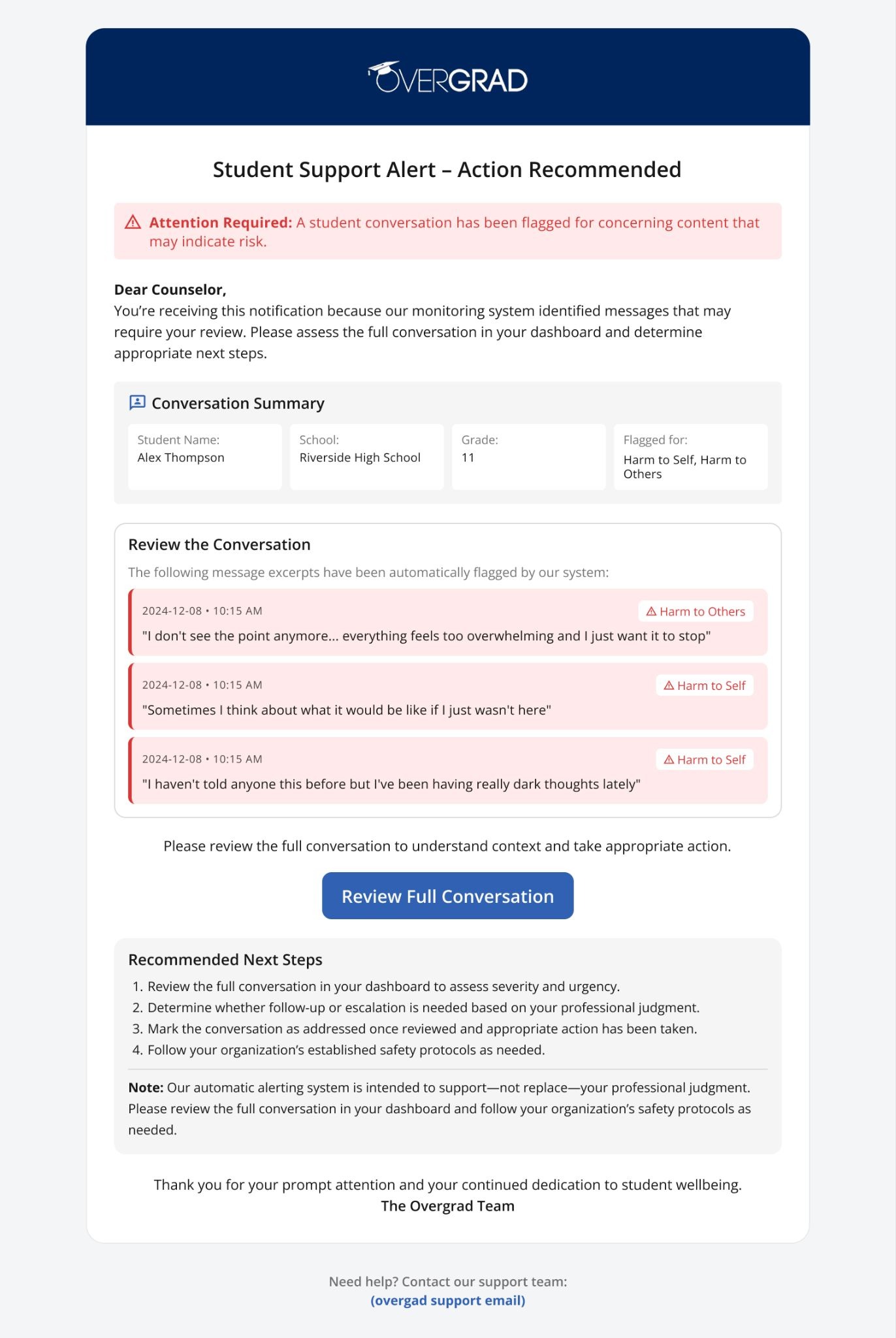
Email contents:
Subject line tagged [URGENT] with urgent / high-priority mail headers
Student name, school, grade level
Flag category and model confidence score
Message timestamp
A truncated excerpt of the flagged message
A direct link to review the full conversation in the Overgrad dashboard
Flagged message alert email example
Maximum delay: Up to ~2 hours from the student sending the flagged message to the counselor receiving the digest email.
Status tracking: Counselors can mark flagged items as Addressed in the dashboard; status changes are recorded in an audit trail.
5. Educator & Counselor Dashboard Access
Independent of the alert email, counselors can at any time:
View any of their students' full Trek conversation histories.
View a list of all flagged content for their students, sorted by priority.
See status (Not Addressed / Addressed) and act on each item.
6. AI Vendor & Model Stack
LLM provider: Anthropic Claude models, accessed through AWS Bedrock.
Training use: Per AWS's standard terms, inputs and outputs sent to Bedrock are not used to train AWS or third-party foundation models, and are not shared with model providers.
Data residency: Model inference occurs within AWS US regions.
Observability: Overgrad uses Braintrust for AI-call observability (prompt/response logging) solely for debugging and quality monitoring. Access is limited to authorized Overgrad engineers.
7. FAQ
Q1. Are student responses stored? Where, and for how long?
Yes. Student messages are stored in Overgrad's production managed cloud database, encrypted at rest. They are retained for the life of the student's account and deleted per district data-processing agreements or on request.
Q2. Who can access student conversations?
The student themselves.
The student's assigned counselor(s) and educators within the student's school, per Overgrad's role-based authorization.
Authorized Overgrad engineering and support staff, for debugging and customer-support purposes only.
External parties do not have access.
Q3. What happens if a student's message is concerning — e.g., references self-harm, abuse, or violence?
Every student message is automatically scanned by a dedicated safety-evaluation AI model. If the message scores above the configured threshold for any safety category, a flagged-content record is created, and the student's assigned counselor receives an [URGENT]-tagged email alert within ~2 hours (batched every 2 hours). The email includes the student's name, a message excerpt, the category, and a direct link to the full conversation.
Q4. Does Overgrad's AI have access to student PII beyond what the student types?
Trek includes the student's first name, grade level, general interests, and post-high-school plan in prompts to personalize responses. It does not include contact information, address, family financial data, or other sensitive PII.
Q5. Are student responses used to train AI models?
No. Overgrad does not use student data to train AI models. The underlying LLM provider (AWS Bedrock) contractually does not use customer inputs or outputs to train its foundation models.
Q6. What third parties receive student chat data?
AWS Bedrock (Anthropic Claude) — for the model inference itself. Data is not retained by AWS for training.
Braintrust — for AI observability/logging, accessible only to authorized Overgrad engineers.
No other third parties receive Trek chat data.
Q7. Can a student or parent request deletion of their chat history?
Yes. Deletion requests are honored per the district DPA and Overgrad's privacy policy.
Q8. How are safety categories and thresholds maintained?
Safety categories and their detection thresholds are configurable by Overgrad. Overgrad can update, add, or remove categories based on observed risks and partner feedback without requiring a software release.
Q9. Is the alerting path real-time?
No — alerts are currently delivered in a batched digest every 2 hours. Overgrad is evaluating near-real-time alerting for high-severity categories (e.g., self-harm) as a future enhancement.
Q10. Are there SMS or phone-call escalations?
Not at this time. Alerting is via email to assigned counselors.
Q11. What if the AI "goes off-script" or produces harmful content?
Trek is configured with strict system prompts that (a) scope responses to career exploration, (b) limit response length, (c) forbid directive language, and (d) refuse to engage with violence, illegal activity, or other unsafe content. In addition, AI-generated messages are themselves eligible for flagging by the moderation pipeline. Prompts and safety rules are version-controlled and reviewable.
This document describes Trek as of April 2026. Features and safeguards evolve; the most current version of this document is available on request.
Was this article helpful?
That’s Great!
Thank you for your feedback
Sorry! We couldn't be helpful
Thank you for your feedback
Feedback sent
We appreciate your effort and will try to fix the article