Tracking student transition data early in the summer leading up to college or a program provides crucial, actionable insights that allow schools to be proactive rather than reactive. This report type helps track data that highlights:
- Improved Persistence and Retention: Early support is directly associated with students being more likely to enroll and re-enroll in their second year of college, ultimately leading to higher completion rates.
- Better Program Fit: Help students clarify and select educational majors and career paths that are consistent with their interests and academic strengths.
- Evaluate Program Effectiveness: Provide real-time feedback on the effectiveness of high school college readiness programs, counseling, and curriculum alignment.
- Data-Driven Decision Making: Build a data-driven approach for allocating resources, designing senior-year supports, and adjusting instruction to address identified gaps.
Creating the report
- Select the menu option Data & Reports > Custom Reports
- Select the "Alumni Data" tile
- Click on the . . . menu then Create a New Report
- Title your report, then begin adding the desired fields (see suggestions below)
- Add a Condition if you want to filter your data by specific criteria (ex: Graduation Year > Equals Any > 2024, 2025)
- Select field options (columns) to include in your report ; we recommend the following fields, listed alphabetically:
- Alumni Data - Current Status
- Alumni Data - Date of First Enrollment
- Alumni Data - Immediate First Fall Enrollment Type
- Alumni Data - Summer Melt?
- College Data - College Name
- Student Rollups - Enrolled College
- Student Rollups - Enrolled Program
- Student Rollups - Enrolled College - Academic Fit
- Student Rollups - Enrolled College - Overall Graduation Rate, or Ethnicity Graduation Rate
- Student - Assigned Counselor
- Student - Graduation Year
- Student - Post High School Plan
- Save Report
- Run Report
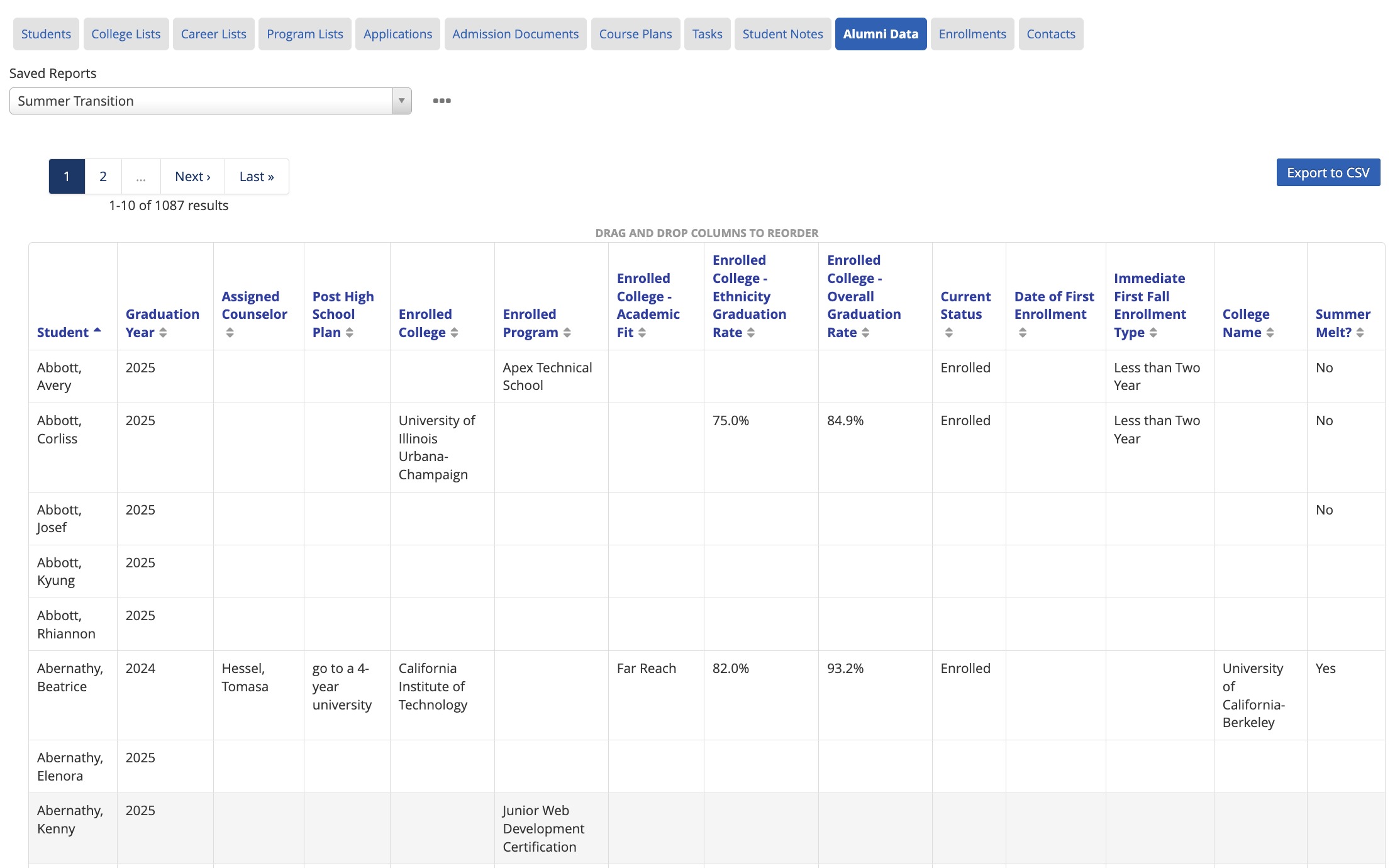
Here's what that report looks after it is created and columns are reorganized:
Report Insights
- Graduation Year and Assigned Counselor can be used to filter or sort data more easily. If the student's Assigned Counselor as an alumni should be different, this helps identify which accounts need to be updated.
- The filed "Post High School Plan" can be updated by students when completing the Senior Survey. Educators can also update this field to track the student's intended plan after graduating.
- The Student Rollup fields for "Enrolled College" or "Enrolled Program" pull information from the student's college/program application(s) from high school. This is a quick way to see which students haven't updated their accounts with intended enrollment or don't have a plan yet.
- Alumni Data and College Data fields populate information from student enrollment records as high school alumni. If counselors are collecting or tracking Fall enrollments, these fields listed would help identify which students don't yet have a record on file. NSC Reports are usually released around November of the Fall term, so adding Manual Enrollments is a great way to track track first year Fall enrollment data early on.
- Summer Melt is an auto-calculated field in Overgrad that looks for a college application with the status "enrolled" and the immediate first fall enrollment record to determine the student's melt status. Learn more about other auto-calculated fields here.
District Account Managers can add and customize a Data Summary and make this report a student list for all educators to view.
Was this article helpful?
That’s Great!
Thank you for your feedback
Sorry! We couldn't be helpful
Thank you for your feedback
Feedback sent
We appreciate your effort and will try to fix the article